
Best Invoice Data Extraction Software in 2026: 8 Tools Compared
Choosing invoice data extraction software depends on more than OCR accuracy. The right tool needs to handle the invoice fields, supplier layouts, line items, review requirements and downstream workflows your team actually uses. This guide compares eight invoice data extraction tools for 2026, including Heyyel Data Extractor, Rossum, Nanonets, Parseur, Mindee, Docsumo, Veryfi and Docparser.
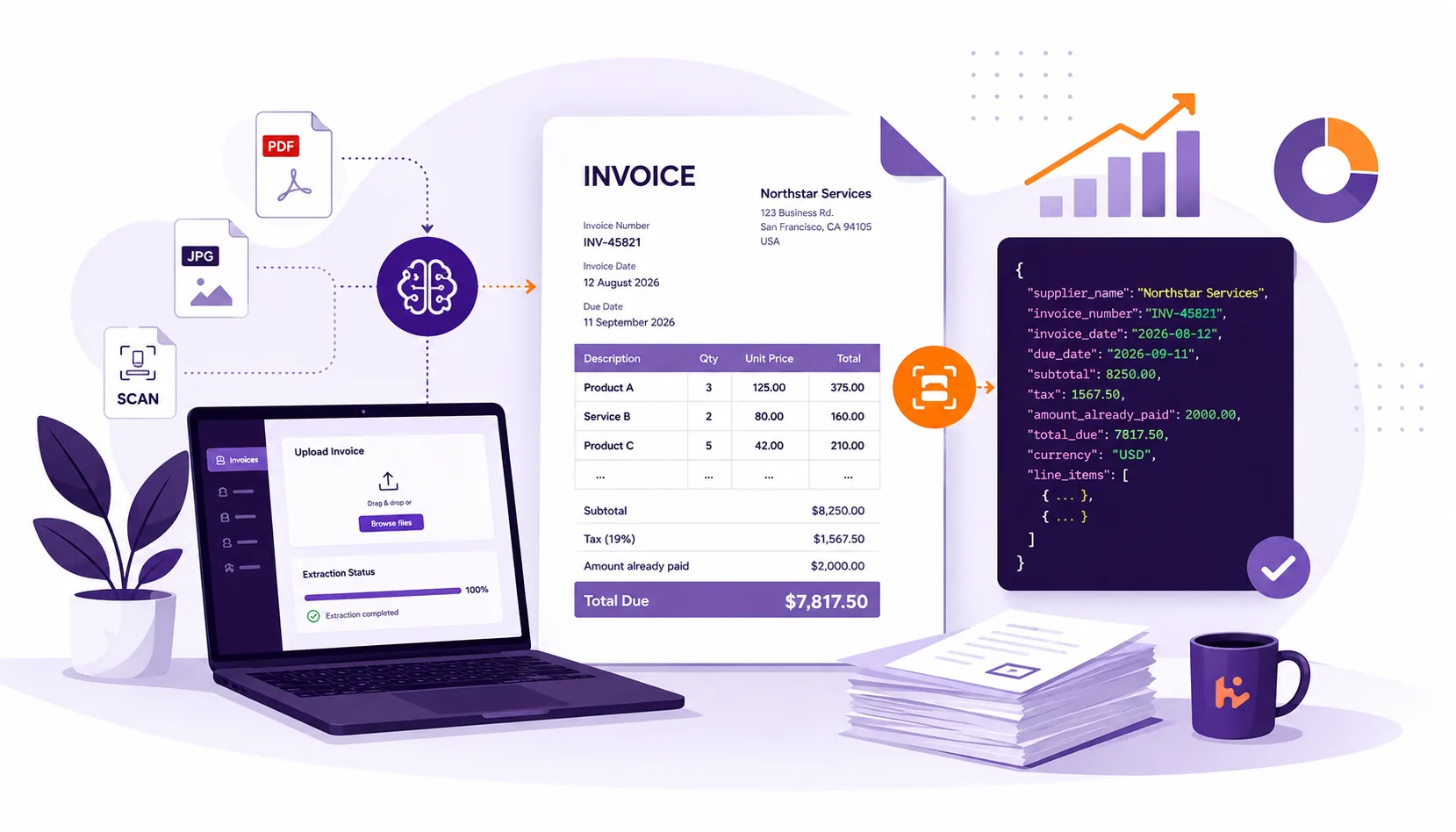
Processing invoices manually becomes inefficient long before it becomes impossible. A finance team may need the same information from every invoice: supplier name, invoice number, invoice date, due date, tax, total amount and individual line items. The difficulty is that invoices rarely follow one consistent format. One supplier puts the invoice number in the top-right corner. Another places it beside the billing address. Some invoices arrive as clean digital PDFs; others are scanned. Tables can span several pages, and the same invoice may contain a subtotal, tax amount, amount already paid and final balance due. Invoice data extraction software turns this information into structured data that can be reused in accounting systems, ERPs, spreadsheets, databases and automated workflows. But the tools available in 2026 solve different problems. Some focus on extracting selected fields. Others provide complete accounts payable automation, human review and approval workflows. Some are designed for non-technical users, while others primarily provide APIs for developers. This guide compares eight invoice data extraction tools based on their documented capabilities and the type of workflow each platform is designed to support.
Best invoice data extraction software at a glance
| Tool | Best for | Custom fields | Line items | Scanned invoices | Workflow / review | Typical setup |
|---|---|---|---|---|---|---|
| Heyyel Data Extractor | Selected invoice fields and custom schemas | Yes | Yes | Yes | Result review | Low |
| Rossum | Enterprise accounts payable automation | Yes | Yes | Yes | Advanced AP workflows | High |
| Nanonets | Extraction plus workflow automation | Yes | Yes | Yes | Review, validation and automation | Medium |
| Parseur | No-code invoice and email workflows | Yes | Yes | Yes | Workflow integrations | Low |
| Mindee | Developer-focused invoice extraction | Yes | Yes | Yes | API-driven | Medium–High |
| Docsumo | Financial extraction with validation | Yes | Yes | Yes | Validation and review | Medium |
| Veryfi | API-first financial document extraction | Configurable | Yes | Yes | API-driven | Medium–High |
| Docparser | Rule-based recurring invoice extraction | Yes | Yes | Yes | Rule-based workflows | Medium |
Typical setup is an indicative comparison of the amount of configuration or integration involved. It is not a performance or accuracy score. The important question is not which platform has the longest feature list. It is: Which tool matches the invoice workflow you actually need?
How we compare invoice data extraction tools
Before evaluating products, define what successful extraction means for your workflow.
Field extraction
Most invoice workflows require information such as:
supplier_name
invoice_number
invoice_date
due_date
purchase_order_number
subtotal
tax
total_due
currency
The challenge is not simply finding numbers and text. A useful extraction system needs to determine which value belongs to which field, even when layouts and labels change between suppliers.
Invoice line-item extraction
Line items are usually more difficult than header fields. Consider:
| Description | Quantity | Unit price | Total |
|---|---|---|---|
| Product A | 3 | 125.00 | 375.00 |
| Service B | 2 | 80.00 | 160.00 |
The extraction system must preserve the relationship between description, quantity, price and total. This becomes harder when:
- descriptions span several lines;
- tables continue onto another page;
- suppliers use different column names;
- discounts appear between products;
- tax is calculated per line;
- rows or columns are poorly aligned.
If line items matter to your workflow, evaluate them separately from standard invoice fields.
OCR and scanned invoices
Digital PDFs often contain machine-readable text. Scanned invoices, photographs and image-based PDFs require OCR or another recognition layer before their information can be interpreted. But invoice OCR is not the same as invoice data extraction. Consider: Subtotal: $8,250 Tax: $1,567.50 Amount already paid: $2,000 Total Due: $7,817.50
OCR may recognize all four amounts correctly. Your extraction workflow still needs to determine that: total_due = 7817.50
and not 8250, 1567.50 or 2000.
That is why a general OCR score does not tell you whether the fields your finance workflow needs will be extracted correctly.
Custom invoice fields
Standard invoice schemas are not always enough. You may also need: project_code cost_center delivery_reference contract_number service_period
Custom invoice fields become particularly important when your internal process relies on information that is specific to your business.
Validation and workflow requirements
Extraction may only be the first step. Some accounts payable workflows also need to:
- validate totals;
- check required fields;
- match invoices with purchase orders;
- route exceptions for review;
- approve invoices;
- send data into an ERP.
If those processes are central to your requirement, a broader AP automation platform may be more suitable than a lightweight extraction tool.
1. Heyyel Data Extractor — Best for selected invoice fields and custom schemas
Heyyel Data Extractor takes a field-based approach. Instead of extracting the complete invoice and searching through the output afterward, you define the information your workflow needs. For example:
supplier_name → Text
invoice_number → Text
invoice_date → Date
total_due → Number
paid → Boolean
You can start from an Invoice document type or configure your own extraction structure. This is particularly useful when your workflow requires fields that go beyond a standard invoice schema. You might need:
project_code
contract_reference
service_period
final_amount_payable
Fields can also include instructions to clarify ambiguous information. Instead of defining: amount
you could define: final_amount_payable
with the instruction:
Extract the final amount still payable after taxes, discounts and previous payments.
This gives the extraction process more context about the exact information your workflow expects.
Example: extracting the exact invoice fields you need with Heyyel Data Extractor
Suppose your finance team receives this invoice: NORTHSTAR SERVICES
Invoice Number: INV-45821 Invoice Date: 12 August 2026 Due Date: 11 September 2026
Project: Website Redesign Contract Reference: CTR-8841
Subtotal: $8,250.00 Tax: $1,567.50 Amount already paid: $2,000.00 Total Due: $7,817.50
Payment Terms: 30 days
There is plenty of information in the document. But your workflow only needs:
supplier_name
invoice_number
invoice_date
project
contract_reference
total_due
Step 1 — Define the fields
In Heyyel Data Extractor, you can configure the expected structure:
| Field | Type |
|---|---|
| supplier_name | Text |
| invoice_number | Text |
| invoice_date | Date |
| project | Text |
| contract_reference | Text |
| total_due | Number |
The invoice contains four monetary values, so total_due needs to be precise.
You can add an instruction:
Extract the final amount still payable after taxes, discounts and previous payments.
The task is no longer simply to recognize $7,817.50.
It is to determine that $7,817.50 corresponds to the field you requested.
Step 2 — Run the extraction
The structured result could look like:
{
  "supplier_name": "Northstar Services",
  "invoice_number": "INV-45821",
  "invoice_date": "2026-08-12",
  "project": "Website Redesign",
  "contract_reference": "CTR-8841",
  "total_due": 7817.50
}
Instead of receiving every word and number from the invoice, the output follows the structure defined for the workflow.
Step 3 — Review and export
The extracted values can be reviewed against the source document before the structured result is exported as JSON or CSV. To see how the extraction process works from upload to structured output, follow the full workflow guide. The value of this approach is not simply that the invoice has been read. It is that you decide what the final dataset should contain before extraction begins.
Choose Heyyel Data Extractor if…
- you need selected invoice fields rather than all document content;
- you want custom fields without building parsing rules;
- invoices come from different suppliers;
- you need JSON or CSV output;
- you want a relatively lightweight extraction layer;
- you do not need a complete purchase-order matching or approval platform.
Trade-off
Heyyel Data Extractor is not positioned as a complete accounts payable suite. Its focus is narrower: turn invoices into the exact structured fields your workflow needs without requiring you to build and maintain a custom parser. If you require complex PO matching, approval routing, accounting coding and extensive ERP orchestration, a broader AP automation platform may be more appropriate. Try Heyyel Data Extractor Invoice Data Extraction →
Learn more about Heyyel Data Extractor's invoice data extraction software and supported invoice fields.
2. Rossum — Best for enterprise AP automation
Rossum targets broader accounts payable automation rather than field extraction alone. Its AP offering combines invoice data capture with capabilities such as complex line-item processing, GL and tax coding, and multi-way matching. Rossum also provides PO matching that can compare individual invoice line items against purchase-order data. The workflow can therefore extend from: Invoice → extraction to: Invoice → extraction → validation → PO matching → coding → review → finance system
Choose Rossum if…
- invoice extraction is part of a larger AP process;
- PO matching is important;
- complex line items need to be processed;
- coding and validation are required;
- enterprise finance-system integration is part of the project.
Trade-off
That broader functionality can be unnecessary if your requirement is simply to extract a small number of invoice fields into structured data.
3. Nanonets — Best for extraction plus workflow automation
Nanonets combines invoice data capture with broader accounts payable automation. Its invoice tooling supports standard fields and line-item information including descriptions, quantities, unit prices and line amounts. Its AP workflows can also include validation, matching, approval routing and downstream accounting or ERP integration. This makes Nanonets relevant when extraction is not the end of the process.
Choose Nanonets if…
- invoice extraction needs to trigger additional workflow steps;
- line-item data is required;
- validation and approvals matter;
- invoices arrive through several channels;
- downstream finance integrations are needed.
Trade-off
For a straightforward invoice-to-JSON or invoice-to-CSV workflow, a complete automation platform may introduce more configuration than necessary.
4. Parseur — Best for no-code invoice workflows
Parseur focuses on document extraction with a no-code workflow. Invoices can be uploaded, forwarded through email or submitted through an API. Parseur can process varying layouts and scanned documents, extract customizable fields and capture line-item tables before sending data to other applications. This makes it particularly relevant when the invoice workflow begins in an inbox. For example: Supplier email → invoice attachment → field extraction → accounting system
Choose Parseur if…
- invoices commonly arrive by email;
- non-technical users need to configure extraction;
- custom fields are required;
- line-item extraction matters;
- connecting documents to other applications is part of the workflow.
Trade-off
If document intake and downstream automation are already handled elsewhere, some of Parseur's broader workflow features may overlap with your existing systems.
5. Mindee — Best for developers
Mindee offers an API-first approach to invoice extraction. Its current Invoice OCR API extracts fields including invoice number, dates, supplier information, purchase-order number, currency, totals, taxes, payment details and line items. It supports PDFs, scans and photos and returns invoice information as structured JSON. Mindee also allows extraction schemas to be customized so developers can select and map the information they require.
Choose Mindee if…
- developers are integrating invoice extraction into an application;
- structured JSON is required;
- line-item extraction matters;
- custom schemas are important;
- API integration is central to the workflow.
Trade-off
Although no-code integrations are available, Mindee remains particularly well suited to technical teams building extraction into their own products or processing pipelines.
6. Docsumo — Best for validation and financial document review
Docsumo combines document extraction with validation. Its invoice-processing workflow can capture selected fields and tables and apply validation rules before the information leaves the platform. Examples in its current documentation include checking whether required fields are present, comparing invoice and due dates, and confirming that line-item totals match the invoice total. This makes Docsumo relevant when extracting the value is only part of the requirement.
Choose Docsumo if…
- extracted data needs validation;
- finance teams need to review results;
- invoices contain detailed tables;
- business rules need to be applied before export;
- several financial document types are processed.
Trade-off
If no validation or review workflow is required, this additional processing layer may be more than a simple extraction use case needs.
7. Veryfi — Best for API-first financial extraction
Veryfi specializes in APIs for financial documents. Teams evaluating Veryfi alternatives may also want to compare how different invoice extraction tools handle custom fields, workflow setup, review and technical integration. Its current Invoice OCR API accepts invoices and returns structured JSON containing information such as vendor details, invoice number, dates, taxes, totals and line items. Veryfi documents support for more than 150 invoice and receipt fields. This makes the platform particularly relevant when invoice extraction needs to become part of another financial application.
Choose Veryfi if…
- developers need an invoice-processing API;
- structured JSON is central to the workflow;
- detailed financial fields and line items matter;
- invoice extraction is being embedded into another product;
- API-driven processing is preferred.
Trade-off
An API-first platform can require more technical integration than a workflow intended primarily for business users uploading and configuring documents themselves.
8. Docparser — Best for rule-based recurring invoice extraction
Docparser takes a more rule-oriented approach. Users create parsing rules defining the information they want to extract. Rules can target invoice dates, totals, identifiers and tables, while line-item rules can capture repeating information. Extracted data can be exported as Excel, CSV, XML or JSON or sent through integrations. This approach can be effective when invoice layouts are relatively predictable. Docparser itself notes an important limitation for line items: unknown invoice layouts may require a dedicated parser or set of rules for each layout.
Choose Docparser if…
- invoices come from recurring layouts;
- you want direct control over parsing rules;
- fields can be located through positions, keywords or table rules;
- rule-based extraction fits your document environment.
Trade-off
When supplier layouts vary significantly, maintaining layout-specific rules can create additional work. For highly variable invoices, a field-based or more flexible AI extraction approach may be easier to maintain.
How to test invoice data extraction software
The most useful comparison is not a vendor demo. It is your own invoice set.
1. Build a representative test set
Include variation:
- several suppliers;
- digital PDFs;
- scanned invoices;
- different layouts;
- multi-page invoices;
- invoices with line items;
- different currencies or languages where relevant;
- invoices containing several totals and dates.
Your test set should resemble what the production workflow actually receives.
2. Define the fields before testing
For example:
supplier_name
invoice_number
invoice_date
due_date
purchase_order_number
subtotal
tax
total_due
currency
For line items:
description
quantity
unit_price
tax
line_total
Do this before testing the platforms so every tool is being evaluated against the same expected output.
3. Test the same documents
Give each platform the same invoice set wherever possible. Otherwise, the comparison says little about relative performance.
4. Compare field-level results
Use a simple table:
| Invoice | Field | Expected value | Extracted value | Correct? |
|---|---|---|---|---|
| Invoice 01 | invoice_number | INV-45821 | INV-45821 | Yes |
| Invoice 01 | total_due | 7,817.50 | 8,250.00 | No |
| Invoice 02 | due_date | 2026-09-11 | 2026-09-11 | Yes |
A simple metric can help: Field accuracy = correctly extracted fields ÷ total fields tested This is much more informative than saying an invoice “looked correctly extracted”. A tool could recognize nearly all the text while still choosing the subtotal instead of the amount due.
5. Test line items separately
For line-item extraction, evaluate:
- number of rows;
- descriptions;
- quantities;
- unit prices;
- discounts;
- tax;
- line totals.
You can use: Line-item accuracy = correctly extracted line-item values ÷ total line-item values tested Only compare percentages between tools when they have been tested on the same documents, fields and evaluation rules.
6. Test difficult cases
Include invoices where:
- a requested field is missing;
- several similar totals appear;
- a label changes;
- a table crosses pages;
- the scan quality is poor;
- a new supplier uses an unfamiliar layout.
These cases often tell you more than perfect demo invoices.
7. Compare maintenance and setup
Accuracy is only one part of the decision. Also ask:
- Does each supplier need a template?
- Can a business user add a new field?
- Does a new layout require new rules or training?
- Can uncertain values be reviewed?
- How are missing fields represented?
- Can the output reach your accounting or ERP system?
- Who needs to maintain the extraction workflow?
The best operational tool is not necessarily the one with the most functionality. It is the one that produces the required data reliably without creating unreasonable configuration and maintenance work.
Which invoice extraction tool should you choose?
| If your priority is… | Consider |
|---|---|
| Selected fields and custom schemas | Heyyel Data Extractor |
| Enterprise AP automation | Rossum |
| Extraction plus workflow automation | Nanonets |
| No-code invoice and email workflows | Parseur |
| Developer API integration | Mindee |
| Validation and review | Docsumo |
| API-first financial extraction | Veryfi |
| Recurring rule-based invoice layouts | Docparser |
This is a workflow-based shortlist, not a universal ranking. A finance team extracting six values into CSV should not necessarily use the same platform as an enterprise performing multi-way purchase-order matching and approval routing.
Start with the invoice workflow, not the feature list
There is no single invoice data extraction software that is best for every organization. The right choice depends on the fields, document variability, review requirements and workflow your team actually needs. Start by defining:
- which fields your workflow actually needs;
- whether line items matter;
- how much supplier-layout variation you receive;
- whether invoices are scanned;
- whether extracted values need review or validation;
- where the structured data needs to go.
Then test two or three platforms against the same representative invoice set. If your requirement is primarily to choose exactly which invoice fields you need and receive them as structured JSON or CSV without building a custom parser, Heyyel Data Extractor provides a field-based approach designed for that workflow. It is not trying to replace an entire accounts payable stack. Its focus is simpler: Invoice → exact fields → structured data Try Heyyel Data Extractor Invoice Data Extraction →
Frequently asked questions
What is the best invoice data extraction software?
It depends on the workflow. Heyyel Data Extractor focuses on selected fields and custom schemas, Rossum on broader enterprise accounts payable automation, Parseur on no-code document workflows, and Mindee and Veryfi on API-oriented extraction. The best choice should be validated using your own invoices rather than a general vendor ranking.
How accurate is invoice data extraction software?
Accuracy depends on factors such as scan quality, supplier layouts, languages, field ambiguity and line-item complexity. Test the same representative invoices across tools and evaluate each field you actually need instead of relying only on a general OCR or accuracy score.
Can invoice extraction software handle different supplier layouts?
Many modern platforms are designed to work across varying invoice layouts, but the amount of configuration required differs. When testing, include invoices from several suppliers and check whether new layouts require additional templates, rules, model configuration or manual intervention.
Can invoice extraction software extract line items?
Yes. Many invoice extraction tools can capture repeating information such as descriptions, quantities, unit prices, taxes and line totals. Line-item extraction should be tested separately from header fields because multi-page tables, multiline descriptions and inconsistent columns can make the task considerably more difficult.
Can I define custom invoice fields?
It depends on the platform.
Custom fields are useful when your workflow needs information beyond common invoice values. For example, you may need a project_code, contract_reference, service_period or internal cost center.
Heyyel Data Extractor allows you to define those fields and add instructions when the field requires additional context.
Do I need invoice extraction software or a complete accounts payable platform?
Not necessarily a complete AP platform. If your main requirement is to turn invoices into structured data for another system, a dedicated extraction layer may be sufficient. A broader accounts payable platform becomes more relevant when you also need purchase-order matching, accounting coding, approval routing, exception management and extensive ERP workflow automation.