
OCR vs Data Extraction: What’s the Difference and When Do You Need Both?
For scanned files, OCR can make document content readable by software. But recognizing words and numbers does not automatically turn them into usable business data through automated document data extraction.
OCR recognizes document content. Data extraction identifies and structures the information your workflow actually needs.
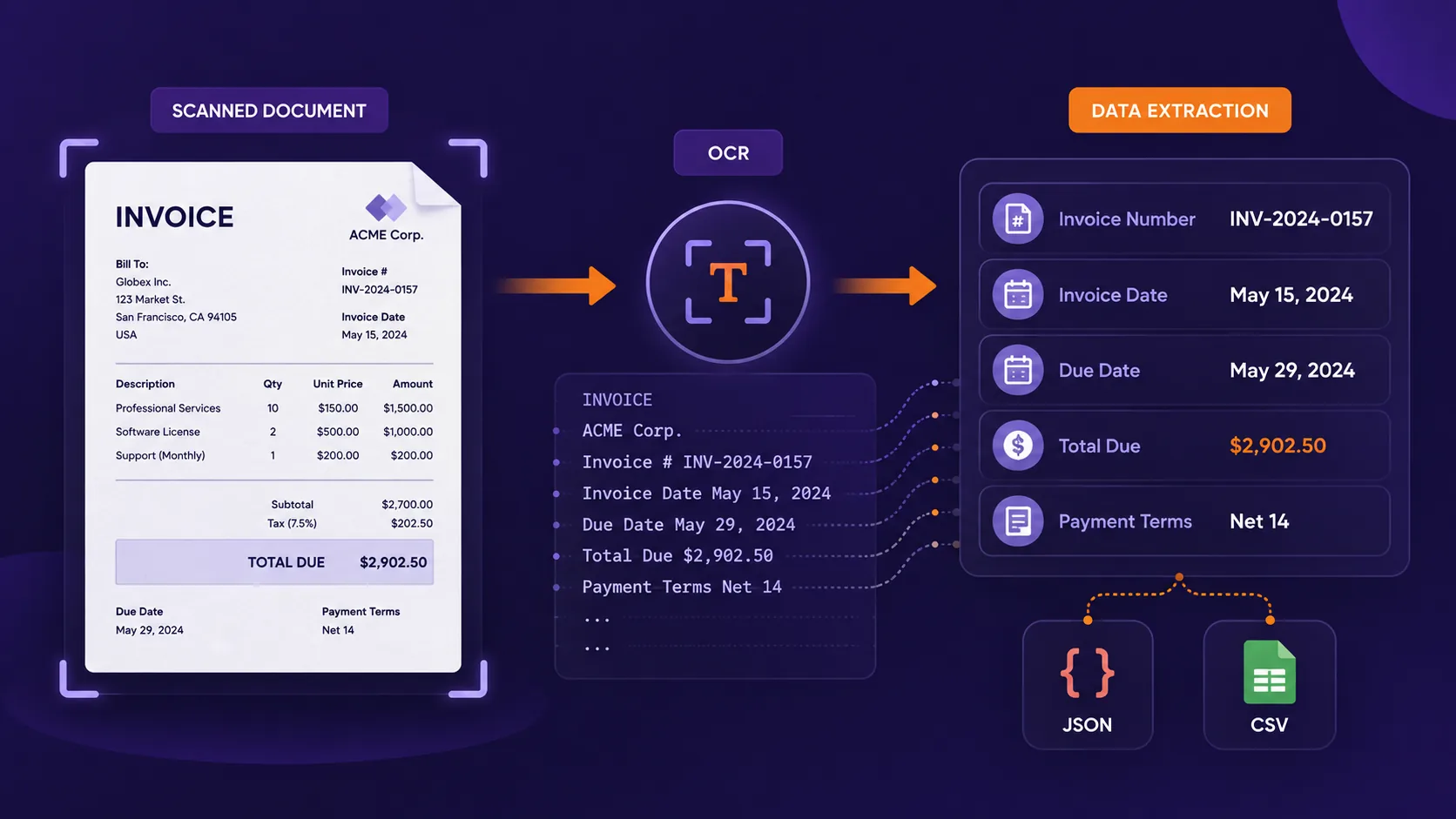
OCR vs data extraction at a glance
| OCR | Data extraction | |
|---|---|---|
| Main purpose | Recognize text from images and scanned documents | Identify and structure useful information |
| Input | Scans, images, photographed documents | Digital documents, scans, images or OCR output |
| Typical output | Machine-readable text | Fields, values, tables or structured records |
| Understands field meaning? | Not necessarily | Designed to identify specific information |
| Example | Recognizes Total Due: $4,850 | Returns total_due: 4850 |
| Typical formats | Text | JSON, CSV or structured data |
| Typical users | Document digitization, search, archiving | Finance, operations, legal, procurement, software workflows |
OCR asks: “What text is on this page?”
Data extraction asks: “Which information on this page does my workflow need?”
What is OCR?
OCR, or Optical Character Recognition, converts text contained in images into machine-readable characters.
A digitally generated PDF often already contains a text layer. A scanned PDF is different: even if a person can clearly read the document, a computer may initially see only an image of those characters.
OCR is commonly used for:
- scanned invoices;
- receipts;
- contracts;
- IDs and forms;
- bank statements;
- photographed or archived paper documents.
OCR makes the content readable. It does not necessarily decide which information is important.
What is data extraction?
Document data extraction identifies selected information inside a document and converts it into a usable structure.
For example, an invoice might contain several values, but your workflow may only need the final structured result:
{
  "supplier_name": "Northstar Services",
  "invoice_number": "INV-2026-487",
  "invoice_date": "2026-08-12",
  "total_due": 4850,
  "payment_terms": "30 days"
}
Instead of receiving document content that still needs to be interpreted, your workflow receives predefined values with clear meanings. The information can then be sent to an ERP, CRM, spreadsheet, database or another automated process.
Practical example: invoice OCR vs data extraction
Imagine this invoice:
NORTHSTAR SERVICES

Invoice Number: INV-45821
Invoice Date: 12 August 2026
Due Date: 11 September 2026

Subtotal: $8,250
Tax: $1,567.50

TOTAL DUE: $9,817.50
There are two dates and three monetary amounts.
What OCR sees
INV-45821
12 August 2026
11 September 2026
$8,250
$1,567.50
$9,817.50
What data extraction returns
{
  "invoice_number": "INV-45821",
  "invoice_date": "2026-08-12",
  "due_date": "2026-09-11",
  "subtotal": 8250,
  "tax": 1567.50,
  "total_due": 9817.50
}Recognizing$9,817.50is an OCR task. Determining that it representstotal_dueis an invoice data extraction task.
Why the distinction matters for business workflows
The difference becomes important when documents feed recurring operational processes. If OCR converts every invoice into searchable text but someone still has to locate the supplier, invoice number, due date and total through manual document processing, part of the process remains manual.
Supplier onboarding
company_name, registration_number, contact_email, payment_terms
Contract review
party_a, party_b, effective_date, expiration_date, renewal_term
Invoice processing
supplier_name, invoice_number, invoice_date, total_due, currency
Bank statements
transaction date, description, amount, debit or credit, balance
How OCR and data extraction work together
For scanned documents, OCR and data extraction are often two stages of the same automated document processing workflow.
Modern document tools may perform these steps inside one workflow, but conceptually they solve different problems.
Do you always need OCR for data extraction?
No. Whether OCR is required depends on the source document.
Digitally generated PDFs
A PDF exported from accounting software, Word or another digital system may already contain machine-readable text. In that case, the workflow can simply be:
Scanned PDFs
A scanned PDF may contain only images of pages. The workflow becomes:
Photos of documents
A receipt or form photographed using a phone also requires OCR before the content can be structured.
When is OCR alone enough?
OCR can be sufficient when machine-readable text is the desired output. For example:
- making scanned PDFs searchable;
- digitizing archives;
- indexing documents for search;
- converting an image of text into editable text;
- copying paragraphs from old documents;
- feeding complete document text into another text-processing workflow.
When do you need structured data extraction?
Data extraction becomes more useful when the document is part of a repeatable business workflow.
Invoice data extraction
supplier name, invoice number, invoice date, due date, total amount, currency
Contract data extraction
contracting parties, effective date, expiration date, renewal terms, selected clauses
Supplier documents
company name, registration number, address, contact information, payment terms
Bank statements
transaction date, description, amount, debit or credit, balance
What about tables and repeated information?
Documents often contain more than simple fields. An invoice may contain many line items, a bank statement may contain hundreds of transactions, and a report may contain repeated measurements.
{
  "invoice_number": "INV-45821",
  "items": [
    {
      "description": "Product A",
      "quantity": 2,
      "unit_price": 125
    },
    {
      "description": "Product B",
      "quantity": 1,
      "unit_price": 80
    }
  ]
}
OCR helps recognize the words and numbers inside the table. Structured extraction determines how those values relate to each other and can return them as arrays or repeated records.
What makes OCR and data extraction difficult?
Common OCR challenges
- low-resolution or blurred scans;
- rotated pages;
- shadows or poor lighting;
- unusual fonts or handwriting;
- damaged documents;
- multiple languages.
Data extraction challenges
- several similar dates;
- multiple amounts or totals;
- different document layouts;
- changing terminology;
- missing fields;
- multi-page tables;
- repeating information.
OCR vs data extraction: which one do you need?
| Your goal | What you need |
|---|---|
| Make a scanned PDF searchable | OCR |
| Convert a document image into text | OCR |
| Retrieve text from a digital PDF | PDF text extraction |
| Retrieve text from a scanned PDF | OCR |
| Extract invoice number and total | Data extraction |
| Extract structured contract fields | Data extraction |
| Process scanned invoices into JSON | OCR + data extraction |
| Extract invoice line items | OCR + structured extraction |
| Convert receipt fields to CSV | OCR + data extraction |
| Extract transactions from scanned statements | OCR + structured extraction |
How field-based data extraction works
One way to structure field-based data extraction is to define the information you need before processing the document.
supplier_name → Text
invoice_number → Text
invoice_date → Date
due_date → Date
total_due → Number
currency → Text
Precise field names help reduce ambiguity. For example, instead of amount, you might use final_amount_payable.
Extract the final amount payable after taxes and discounts.
The same principle applies to dates. Instead of date, use a field such as contract_effective_date.
OCR and data extraction with Heyyel Data Extractor
Heyyel Data Extractor is designed for workflows where the objective is to turn documents into selected structured information. For common document categories, you can start from suggested fields. For business-specific documents, Custom / Blank lets you define your own extraction structure.
Fields can represent text, numbers, dates, booleans and repeating information. For cases where you need broader document content rather than selected fields, Heyyel Data Extractor also provides Raw data.
Results can then be reviewed and exported as JSON or CSV.
OCR makes documents readable. Data extraction makes the information usable.
For searchable archives, OCR alone may be enough. For invoices, contracts, forms, statements and other recurring workflows, structured extraction can return information in a format your business can use directly.
Extract data from your document →Frequently asked questions
What is the main difference between OCR and data extraction?
OCR recognizes text from scanned or image-based documents. Data extraction identifies specific information within a document and returns it as fields, tables or other structured data.
Is OCR the same as PDF data extraction?
No. OCR can be part of PDF data extraction, particularly for scanned files, but its main role is text recognition. Data extraction determines which recognized information corresponds to the fields you need.
Can OCR extract invoice data?
OCR can recognize invoice text and numbers. Structured invoice data extraction is needed when you want to identify specific values such as the supplier, invoice number, date and total.
Do digital PDFs need OCR?
Not always. Digitally generated PDFs often already contain machine-readable text, allowing text or data extraction to work directly with the existing document content.
Can OCR output be converted to JSON?
Yes. The recognized text first needs to be mapped into a defined structure. A document data extraction workflow can then return selected values as JSON.
What is OCR data extraction?
OCR data extraction combines text recognition with structured extraction: OCR makes the content machine-readable, then the extraction process identifies and structures the information required.
Can I extract data from scanned PDFs?
Yes. OCR can first recognize content in the scanned PDF, after which structured extraction can identify specific fields, tables or repeating information.
Should I use OCR or data extraction for invoices?
For a digitally generated invoice, structured data extraction may be sufficient. For a scanned invoice, OCR and data extraction are typically used together.