
Manual Data Entry vs Automated Document Data Extraction: When Should You Automate?
Manual data entry works — until the same task has to be repeated again and again.
Automated document data extraction does not eliminate human judgment. It separates repetitive document handling from the decisions that still need people.
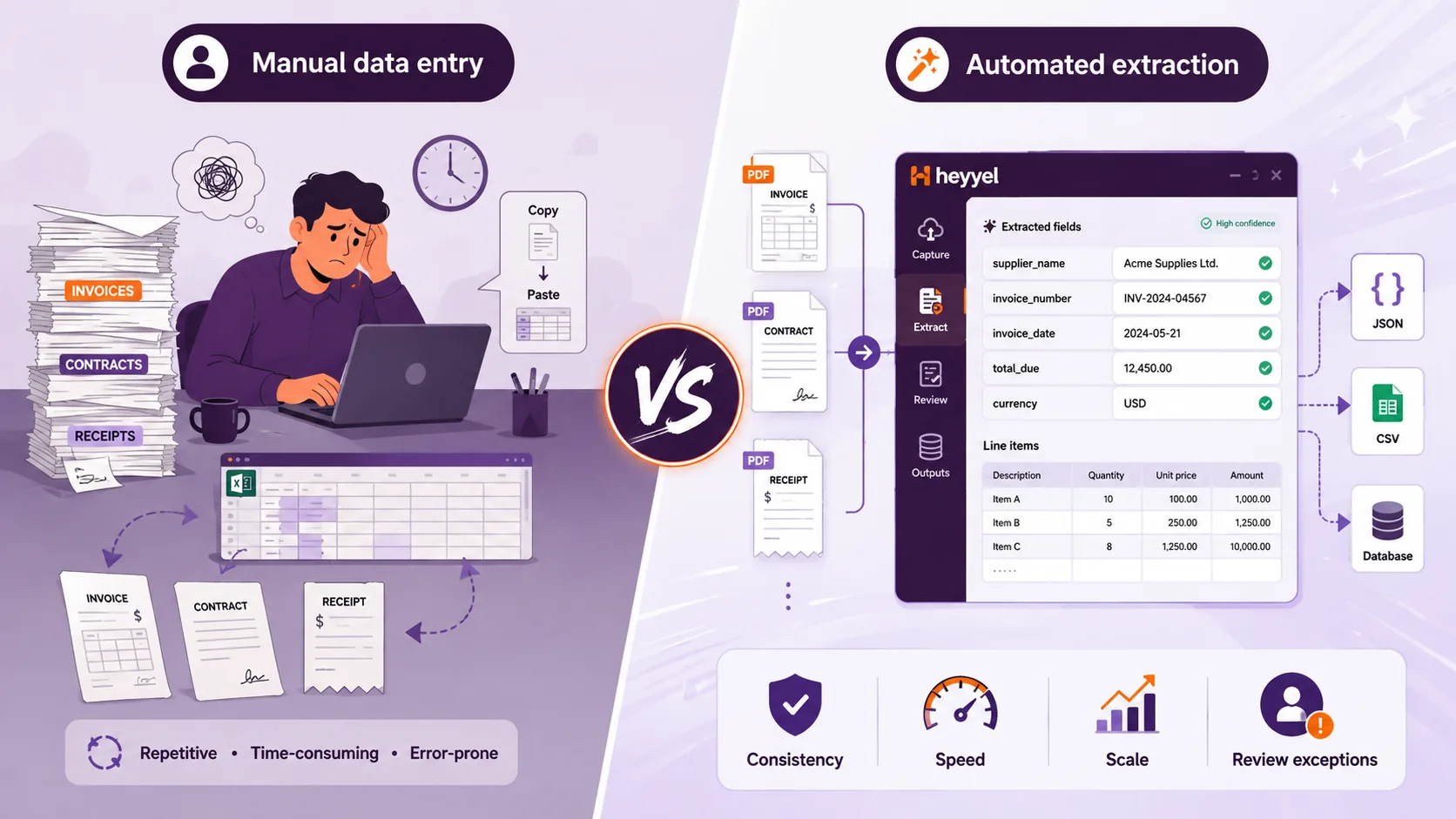
Manual data entry vs automated data extraction at a glance
| Manual data entry | Automated document data extraction | |
|---|---|---|
| How data is captured | A person reads and enters information | Software identifies and structures selected values |
| Typical input | PDFs, scans, forms, documents | PDFs, scans, images and digital documents |
| Typical output | Manually entered spreadsheet, ERP or database records | JSON, CSV or structured fields |
| Best for | Small or occasional tasks | Recurring document workflows |
| Handling volume | Manual work grows with document volume | Designed for repeated extraction |
| Consistency | Depends on people and process | Uses a defined extraction structure |
| Changing layouts | Humans adapt naturally | Depends on extraction method and configuration |
| Initial setup | Very low | Requires initial configuration |
| Human role | Read, interpret, enter and review | Review results, handle exceptions and make decisions |
Neither method is automatically better.
The question is whether manual effort is still justified by the amount of judgment the task actually requires.
What is manual data entry?
Manual data entry means reading information from one source and entering it into another system by hand.
Imagine an invoice containing:
Supplier: Northstar Services
Invoice Number: INV-45821
Invoice Date: 12 August 2026
Due Date: 11 September 2026
Subtotal: $8,250
Tax: $1,567.50
Total Due: $9,817.50
A team member may need to transfer:
supplier_name
invoice_number
invoice_date
due_date
total_due
For one document, this is simple. The challenge appears when the same fields must be located, interpreted and transferred across many documents.
Why manual entry still makes sense
People are good at handling variation. A person can notice that:
- “Total Due” is different from “Subtotal”;
- a supplier changed its invoice layout;
- a required field is missing;
- a handwritten note changes the context;
- an unusual document requires interpretation.
For occasional or highly unpredictable work, that flexibility can make manual entry the simplest solution.
What is automated document data extraction?
Automated document data extraction identifies information inside a document and returns it in a predefined structure.
supplier_name → Text
invoice_number → Text
invoice_date → Date
total_due → Number
currency → Text
The document can then return:
{
  "supplier_name": "Northstar Services",
  "invoice_number": "INV-45821",
  "invoice_date": "2026-08-12",
  "total_due": 9817.50,
  "currency": "USD"
}The important change is that the repeated conversion from document content to structured business data does not have to be performed manually for every file.
When does manual document processing become inefficient?
Manual processing becomes harder to justify when the workflow is predictable but repeated.
For every invoice, someone may need to:
- open the file;
- find the supplier;
- locate the invoice number;
- identify the correct date;
- distinguish the subtotal from the final total;
- enter the values;
- review them;
- move to the next document.
Similar patterns appear in invoice processing, supplier onboarding, contract administration, purchase orders, expense documents, bank statements, logistics forms and customer applications.
The strongest automation candidates are often not the most complicated workflows. They are the workflows where people repeatedly do the same predictable work.
Accuracy and consistency: manual vs automated
Automation should not be presented as automatically more accurate than human work. Both approaches can produce errors.
Manual errors
Mistyped values, wrong totals, inconsistent date formats or missing fields.
Automated errors
Ambiguous, damaged or poorly configured documents can still produce incorrect values.
The advantage of structured extraction is often consistency.
Instead of a vague field such as:
amountyou can define:
final_amount_payableExtract the final amount payable after taxes and discounts.
Likewise, instead of date, use contract_effective_date with a precise instruction.
Extract the date on which the agreement becomes effective, not the signature date.
For many workflows, the practical model is:
What document workflows are good candidates for automation?
Invoice data entry automation
supplier_name, invoice_number, invoice_date, due_date, total_due, currency
Contract data extraction
party_a, party_b, effective_date, expiration_date, renewal_term, governing_law
Supplier onboarding
company name, registration number, address, contact details, payment terms, banking information
Bank statements
dates, descriptions, amounts, debit/credit, balances and repeating transaction records
What about scanned documents?
Manual processing works with both digital and scanned documents because people can visually read them.
Automated workflows need machine-readable content. For image-based documents, OCR or another document-recognition method can be used before the required information is structured.
OCR recognizes the text. Data extraction identifies and structures the information you need.
What about tables, line items and repeated data?
Manual data entry becomes especially repetitive when documents contain tables.
{
  "items": [
    {
      "product": "Product A",
      "quantity": 2,
      "unit_price": 125
    },
    {
      "product": "Product B",
      "quantity": 1,
      "unit_price": 80
    },
    {
      "product": "Product C",
      "quantity": 5,
      "unit_price": 42
    }
  ]
}
Repeated information is often where the difference between manual processing and structured extraction becomes most visible.
Should you automate your document workflow?
A useful decision does not begin with “Can this be automated?” It begins with:
Is this workflow repetitive enough that automation is worth testing?
Are the same fields extracted repeatedly?
A stable set of fields is a strong automation signal.
Is the process recurring?
A daily or weekly task is a different automation candidate from something done once a year.
Does the information go into another structured system?
ERP, CRM, spreadsheets, databases and accounting tools are common downstream destinations.
Do layouts vary while the required fields stay the same?
The meaning of the field is often more important than its visual position.
Does every document require human judgment?
If people mainly search for and copy known fields, much of the work may be mechanical.
How much configuration will automation require?
Compare setup effort with the recurring manual work it can remove.
When is manual data entry still the better option?
Manual processing may remain more practical when:
- document volume is very low;
- the task is temporary;
- required fields change constantly;
- every document requires substantial interpretation;
- documents have little in common;
- no repeatable workflow exists;
- setup would require more work than the task itself.
The goal should never be automation for the sake of automation.
What should you automate first?
Do not begin by trying to automate every document process in the company.
Start with a workflow that has:
- recurring documents;
- clearly defined fields;
- regular manual entry;
- structured downstream data;
- limited need for interpretation.
A supplier invoice workflow is a strong example.
supplier_name
invoice_number
invoice_date
total_due
currency
Then test real variation: different suppliers, digital PDFs, scanned PDFs, missing fields and several similar dates or totals.
Manual data entry and automated extraction with Heyyel Data Extractor
Heyyel Data Extractor is designed for workflows where you already know which information you want from a document.
For standard document categories, you can start with suggested fields. For business-specific documents, Custom / Blank lets you define your own extraction structure.
supplier_name
invoice_number
due_date
total_due
payment_status
Fields can represent text, numbers, dates, booleans and repeating or structured information.
For scanned documents, document recognition allows visible content to be processed before the required information is structured. When broader document content is needed instead of predefined fields, Heyyel Data Extractor also provides Raw data.
Results can then be reviewed and exported as JSON or CSV.
Automate the repetitive part first
Manual data entry remains useful for occasional tasks, unusual documents and workflows that genuinely require judgment. Automation becomes valuable when people repeatedly retrieve the same information from recurring documents.
Try Heyyel Data Extractor →Frequently asked questions
What is the difference between manual data entry and automated data extraction?
Manual data entry requires a person to locate and enter information into another system. Automated data extraction identifies predefined information inside a document and returns it as structured data.
When should manual data entry be automated?
Automation is worth considering when the same fields are repeatedly extracted from recurring documents and transferred into another structured system.
Is automated data extraction more accurate than manual data entry?
Not automatically. Accuracy depends on document quality, extraction configuration and the information being processed. Automation can improve consistency while human review remains useful for exceptions.
Can automated data extraction replace manual invoice entry?
It can automate much of the repetitive extraction work. Human review can still be retained for exceptions, approvals or unusual documents.
Can scanned documents be processed automatically?
Yes. OCR or document recognition can make scanned content machine-readable before selected information is extracted and structured.
What documents can be used for data entry automation?
Common examples include invoices, receipts, contracts, supplier forms, purchase orders, bank statements and other recurring business documents.
Is automated document data extraction the same as OCR?
No. OCR recognizes text from scanned or image-based documents. Data extraction identifies the specific information required and organizes it into structured fields or records.
Can automated document extraction return JSON or CSV?
Yes. Structured extraction tools can return selected document information in formats such as JSON or CSV for downstream use.