
How AI Document Data Extraction Works
People can usually understand a document from its labels, layout and context. Software needs a more explicit process.
AI document data extraction combines document recognition, context and field identification to turn document content into structured data.
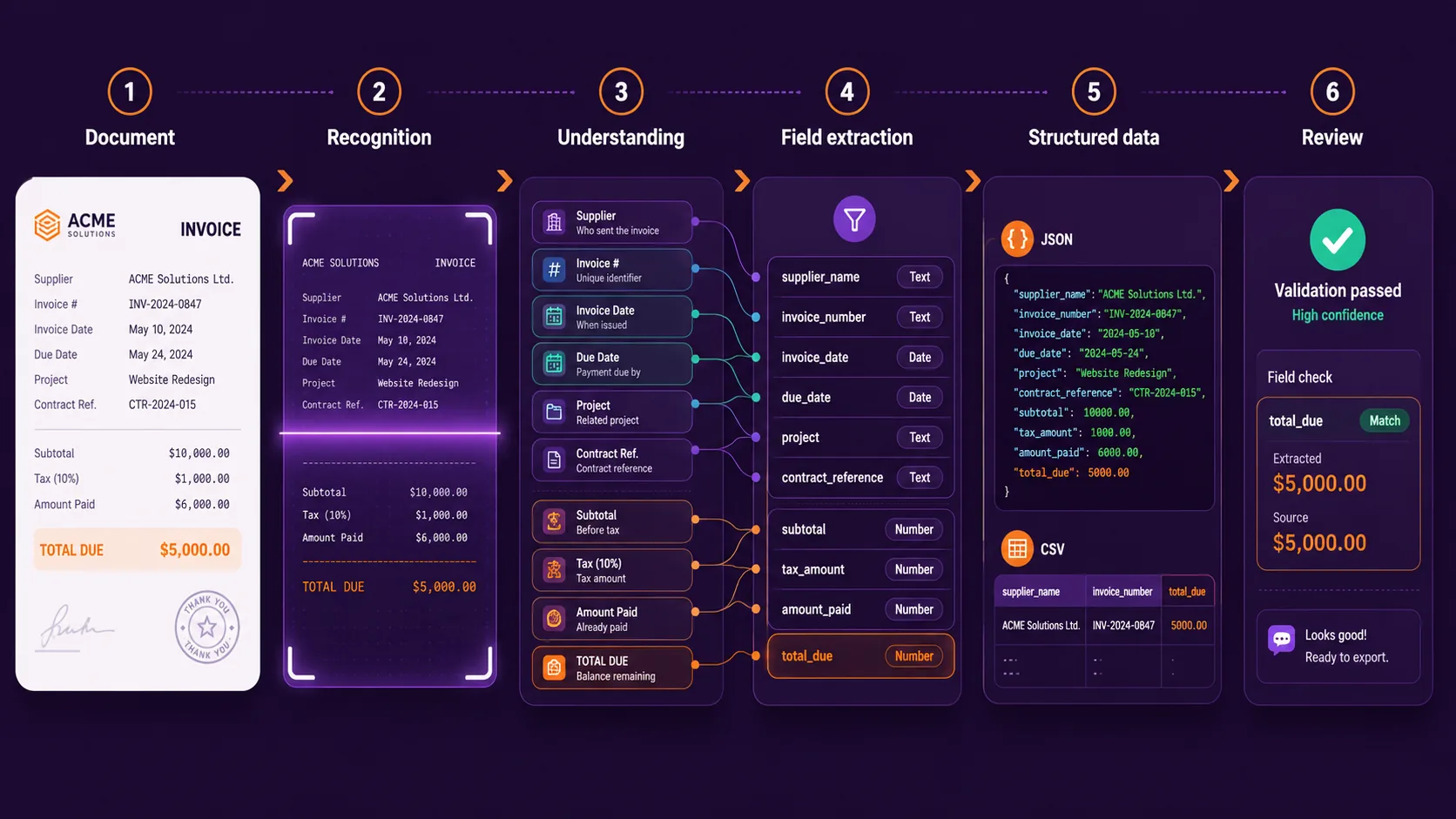
Simplified workflow:
This guide explains what happens at each stage of the document extraction workflow, where OCR fits in, how custom fields and tables are handled, and why defining the expected output matters as much as reading the document itself.
The stages below describe the functional process from the user’s perspective rather than claiming that every product uses the same internal models.
AI document data extraction at a glance
Consider this invoice:
NORTHSTAR SERVICES

Invoice Number: INV-45821
Invoice Date: 12 August 2026
Due Date: 11 September 2026

Project: Website Redesign
Contract Reference: CTR-8841

Subtotal: $8,250.00
Tax: $1,567.50
Amount already paid: $2,000.00
Total Due: $7,817.50

Payment Terms: 30 days
A person can immediately tell that:
- Northstar Services is the supplier;
INV-45821is the invoice number;- there are two different dates;
- four monetary values appear;
$7,817.50represents the final amount still due.
Software needs to transform those observations into a structured result such as:
{
  "supplier_name": "Northstar Services",
  "invoice_number": "INV-45821",
  "invoice_date": "2026-08-12",
  "project": "Website Redesign",
  "contract_reference": "CTR-8841",
  "total_due": 7817.50
}
Getting from the original invoice to that JSON result involves several distinct tasks.
The document enters the extraction workflow
Everything starts with the source document.
- a digital PDF;
- a scanned PDF;
- an image;
- an invoice;
- a receipt;
- a contract;
- a bank statement;
- an internal form;
- another business-specific document.
The format matters because documents do not all expose their content in the same way. A digitally generated PDF may already contain machine-readable text. A scanned PDF may contain only images of pages. A contract may mainly consist of paragraphs, while an invoice contains labels, totals and tables.
From the user’s perspective in Heyyel Data Extractor, the workflow starts by uploading the document and deciding what kind of result is needed. For common document types, you can start from suggested fields. For a business-specific workflow, Custom / Blank lets you define the extraction structure yourself.
You are not only providing a document. You are also defining what you expect to get back from it.
The content becomes machine-readable
Before a system can identify business information, it needs access to the document content.
For digital PDFs, text may already be available. For scanned documents or images, OCR — Optical Character Recognition — is typically needed to recognize visible characters.
Invoice Number: INV-45821
Invoice Date: 12 August 2026
Total Due: $7,817.50
This is an important stage, but it is not the end of extraction. OCR can tell the system that the document contains several visible amounts:
$8,250.00
$1,567.50
$2,000.00
$7,817.50
It does not automatically mean the workflow knows which value represents total_due.
OCR makes document content readable. Structured extraction determines which parts of that content correspond to the information the workflow needs.
You define the expected extraction structure
This is where field-based extraction becomes important. Instead of asking the system to return everything contained in the invoice, you define the information you actually need.
supplier_name
invoice_number
invoice_date
project
contract_reference
total_due
In Heyyel Data Extractor, those fields can be configured with appropriate data types:
| Field | Type |
|---|---|
supplier_name | Text |
invoice_number | Text |
invoice_date | Date |
project | Text |
contract_reference | Text |
total_due | Number |
This schema tells the extraction workflow what the final result should contain.
The system uses document context to identify values
Documents communicate meaning through more than individual words. Position, labels, surrounding text and structure all help establish relationships.
Invoice Date: 12 August 2026
Due Date: 11 September 2026
Both values are dates. The extraction problem is not “Find a date.” It is “Find the date that corresponds to invoice_date.”
Contract Reference: CTR-8841The value CTR-8841 becomes meaningful because of the surrounding label and document context. This is one reason AI-based extraction can be more flexible than a parser that depends entirely on fixed coordinates.
Extraction instructions help resolve ambiguity
Field names are not always enough. Extraction instructions can provide additional context when a field needs more precision. Our sample invoice contains four monetary values:
Subtotal: $8,250.00
Tax: $1,567.50
Amount already paid: $2,000.00
Total Due: $7,817.50
A field called amount would be ambiguous. A better field is total_due.
Extract the final amount still payable after taxes, discounts and previous payments.
Now the workflow has two pieces of context:
- Field:
total_due - Instruction: final amount still payable
The expected value becomes 7817.50 rather than 8250.
The same principle applies to dates. Instead of a vague field such as date, use a more precise field such as contract_effective_date with an instruction like:
Extract the date on which the agreement becomes effective, not the signature date.
Tables and repeated information need structure too
Not every document consists of isolated key-value fields. Invoices may contain line items. Bank statements contain transactions. Reports may contain repeated measurements.
| Description | Quantity | Unit price | Total |
|---|---|---|---|
| Design work | 2 | 2,500 | 5,000 |
| Development | 1 | 3,250 | 3,250 |
Extracting every cell as unrelated text would lose important relationships. A useful structured representation preserves those relationships:
{
  "items": [
    {
      "description": "Design work",
      "quantity": 2,
      "unit_price": 2500,
      "total": 5000
    },
    {
      "description": "Development",
      "quantity": 1,
      "unit_price": 3250,
      "total": 3250
    }
  ]
}
This is why repeated information is often represented using arrays or nested structures rather than forcing everything into one text field.
Extracted information becomes normalized structured data
Once the requested values have been identified, the result can be represented using consistent data types.
Invoice Date: 12 August 2026
Total Due: $7,817.50
can become:
{
  "invoice_date": "2026-08-12",
  "total_due": 7817.50
}
The document uses natural-language dates, currency formatting, labels and free-form text. The output uses predictable field names, defined data types and a consistent structure.
{
  "supplier_name": "Northstar Services",
  "invoice_number": "INV-45821",
  "invoice_date": "2026-08-12",
  "project": "Website Redesign",
  "contract_reference": "CTR-8841",
  "total_due": 7817.50
}
The practical goal is not simply PDF → text, but Document → information that can become structured data another system can use.
Review the result before using it downstream
AI extraction should not automatically be treated as perfect. Real documents can contain poor scans, missing fields, unexpected layouts, ambiguous labels, handwritten information, multi-page tables and several similar dates or amounts.
For important workflows, extracted values may therefore need to be reviewed against the source document before they are used elsewhere.
total_due = 7817.50should correspond to:
Total Due: $7,817.50rather than:
Subtotal: $8,250.00Human review and automation do not need to be opposites. A good workflow automates repetitive retrieval while preserving review where it adds value.
Export the structured result
Once the extracted information is ready, it needs to move to the next step. With Heyyel Data Extractor, structured results can be exported as JSON or CSV.
JSON
Useful when software will consume the data, several data types are involved, or nested and repeating information needs to be preserved.
CSV
Useful when the next step involves a spreadsheet or when the output should become a tabular dataset.
The original workflow might have been:
Open invoice → Find value → Copy → Paste into spreadsheet → Repeat
The automated workflow becomes:
Upload → Define fields → Extract → Review → Export
Why the expected output matters so much
One of the most important ideas in AI document extraction is that the source document alone does not define the workflow. The desired output matters too.
Suppose a 12-page contract contains 30 dates. If your workflow needs only contract_effective_date and contract_expiration_date, there is little value in returning 30 unlabeled dates.
Similarly, an invoice may contain dozens of fields, but an internal workflow may only require supplier_name, invoice_number and total_due.
Field-based extraction starts with the question: What does the next system actually need?
AI extraction vs traditional document parsing
Traditional document parsers often use fixed page coordinates, regular expressions, templates, exact labels and custom parsing rules. These methods can work very well when documents are predictable.
The challenge appears when layouts vary. Supplier A might use Invoice Number, Supplier B Invoice #, and Supplier C Document Reference, while each positions the information differently.
AI-based document extraction can use more of the surrounding content and context rather than relying only on one fixed coordinate or label. That does not make traditional parsing obsolete. The appropriate approach depends on document consistency, workflow requirements and the level of control needed.
What happens with documents that do not fit a standard category?
Not every document is an invoice, receipt or contract. Organizations also work with internal forms, supplier documents, technical reports, project records, industry-specific paperwork and custom templates.
In Heyyel Data Extractor, Custom / Blank lets you define a schema from scratch:
project_name → Text
site_reference → Text
inspection_date → Date
measurement → Number
approved → Boolean
The same extraction principle still applies:
- define the expected fields;
- process the document;
- identify the corresponding values;
- return them in a consistent structure.
What about Raw data?
Structured fields are useful when you already know which information matters. But sometimes you need broader document content. In those cases, Raw data can be useful when analyzing a full report, passing the content into another text-processing workflow or inspecting information before deciding which fields matter.
Use Raw data when
You need broader document content.
Use field-based extraction when
You already know which values the workflow needs.
Where AI document extraction works well — and where review matters
AI extraction is particularly useful when the same types of information appear across documents with varying layouts, including invoices, contracts, receipts, supplier onboarding documents, bank statements and business-specific forms.
But real documents can still be difficult. Pay particular attention to:
- poor-quality scans;
- multiple similar values;
- unusual terminology;
- multi-page tables;
- missing fields;
- handwritten content;
- highly unusual layouts.
The right evaluation question is not “Does this tool use AI?” It is “Does it return the fields my workflow needs from the documents I actually receive?”
How to evaluate AI document data extraction
Start with your expected fields:
supplier_name
invoice_number
invoice_date
total_due
Then test representative documents. Use a simple comparison:
| Document | Field | Expected value | Extracted value | Correct? |
|---|---|---|---|---|
| Invoice 01 | supplier_name | Northstar Services | Northstar Services | Yes |
| Invoice 01 | total_due | 7,817.50 | 7,817.50 | Yes |
| Invoice 02 | invoice_date | 2026-08-15 | 2026-08-15 | Yes |
Include difficult cases too: scanned documents, different layouts, missing fields, several totals, multiple dates and tables across pages.
Field accuracy = correctly extracted fields ÷ total fields tested
AI document extraction is more than reading a PDF
AI document data extraction is sometimes described as software “reading” a document. That description misses the most important part.
OCR may make the text readable. Document structure helps establish relationships. Field definitions tell the workflow what information matters. Instructions help resolve ambiguity. Structured output makes the result usable by another system. And review can remain in the process when the information needs verification.
{
  "supplier_name": "Northstar Services",
  "invoice_number": "INV-45821",
  "invoice_date": "2026-08-12",
  "project": "Website Redesign",
  "contract_reference": "CTR-8841",
  "total_due": 7817.50
}
That transformation — from document content to the exact structured information a workflow needs — is the practical purpose of AI document data extraction.
From document content to structured data
With Heyyel Data Extractor, you can start from predefined document types or define your own schema with Custom / Blank, add context to ambiguous fields, review the extracted values and export the structured result as JSON or CSV.
Try structured document extraction with Heyyel Data Extractor →Frequently asked questions
How does AI extract data from documents?
AI document extraction typically combines document recognition with analysis of content, layout and context. The system identifies values corresponding to requested fields and returns them in a structured format.
Is AI document extraction the same as OCR?
No. OCR primarily makes text from scans and images machine-readable. Data extraction goes further by identifying which information corresponds to fields such as an invoice number, effective date or total amount.
Can AI extract custom fields from documents?
Yes, depending on the extraction tool. Configurable systems such as Heyyel Data Extractor allow users to define business-specific fields rather than relying only on predefined document schemas.
How does AI extract tables and line items?
Table extraction needs to preserve relationships between rows and columns. Repeated information can then be represented using arrays or other structured records instead of returning every cell as unrelated text.
How accurate is AI document data extraction?
Accuracy depends on factors such as document quality, layout variation, field ambiguity, languages and table complexity. The best way to evaluate extraction is to test the exact fields you need across representative documents.